Continuous Monitoring
How Trace keeps your codebase covered between pull requests — daily scans, drift detection, and regression alerts.
A pull request scan covers what's changing. A continuous-monitoring scan keeps you safe between pull requests — when individual PRs were each clean, but the combination of recent changes (or new external information) introduces an issue.
Trace runs daily scans against the default branch of every connected repository. The point is to catch the issues that emerge after code has merged: a CVE disclosed yesterday that applies to a dependency you've had for months, a vulnerable interaction between two services that landed in separate PRs, or a regression introduced by a fix that didn't fully close a previously-resolved issue.
How daily scans work
Every connected repository gets one incremental scan per day against its default branch. The scan:
- Runs SAST and Secrets against the new commits since the last successful scan.
- Re-checks all dependencies against the current advisory ecosystem, even if your lockfile hasn't changed — so newly disclosed CVEs surface within 24 hours of disclosure.
- Re-attempts live-secret verification on Secrets findings where the original probe was inconclusive — a credential that's since been rotated will move off your dashboard automatically.
- Re-evaluates open vulnerabilities against the current code (a fixed vulnerability gets closed; a regressed one reopens automatically).
The scan runs quietly in the background and produces only the findings that are actually new since yesterday. Nothing gets re-reported on a daily basis.
Drift detection
Most security issues you'll deal with as your codebase ages aren't from new code — they're from old code that the world has changed around, or from interactions between changes that only surface in combination. A few patterns continuous monitoring catches:
- A new CVE is disclosed for a dependency you already shipped. Reachability is re-evaluated. If the vulnerable function is reachable from your application code, the vulnerability appears in your dashboard with the same severity it would have had if you'd just installed the package.
- A secret's verification status changes. If the original probe couldn't confirm a key was active and the provider now responds with "valid token," the finding gets escalated. Conversely, if a credential has since been rotated, the corresponding vulnerability closes out.
- A vulnerability you marked
FIXEDreopens. If somebody marked a vulnerability as fixed but the engine still detects it — or a later commit reintroduces the same pattern — the vulnerability moves back toOPENwith a note about the scan that re-detected it. You don't get a duplicate finding; you get the original record back, so the lifespan and history stay intact.
When monitoring turns on
Daily monitoring activates after your initial onboarding scan completes for a repository. We deliberately don't fire automated scans against a brand-new connected repo on day zero — the goal of onboarding is to tune the platform to your code first, agree on severity calibration, and clear (or suppress) any noise before you start receiving routine output.
Once onboarding is complete, monitoring activates automatically for every connected repository. New repositories added later inherit the org-level configuration.
Coverage and exclusions
Daily monitoring covers the default branch of every connected repository. The more common knob to turn is notification routing — if a repo doesn't need to page anyone on new findings, adjust the subscription rather than disabling monitoring. You keep coverage without alert fatigue.
How it shows up
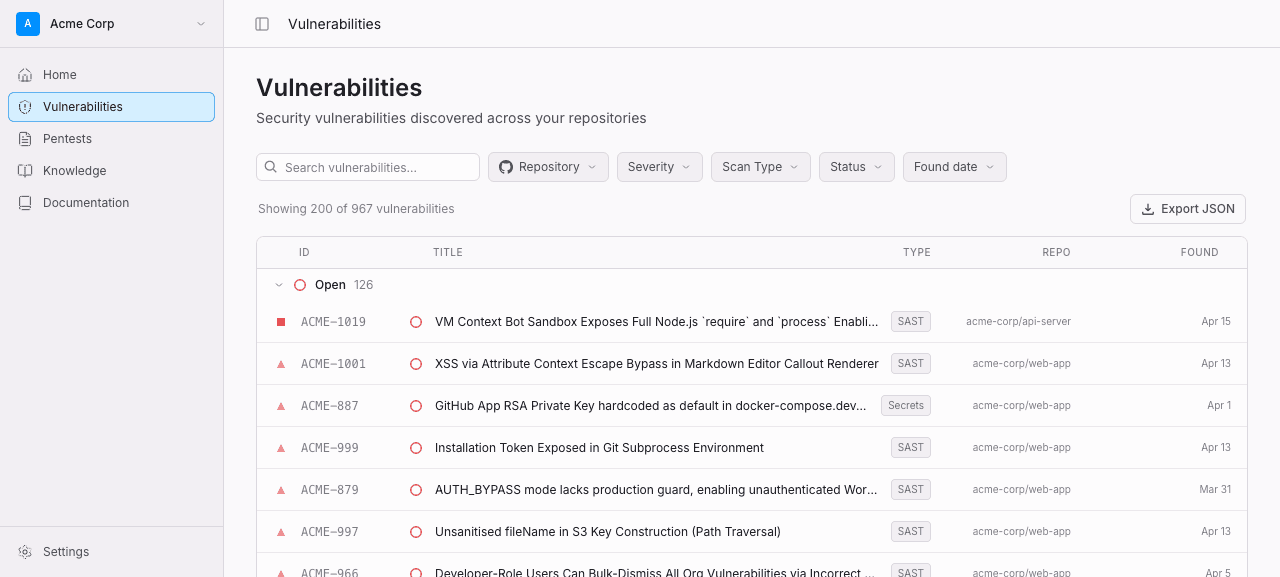
Findings from daily scans appear in:
- The dashboard — same place as everything else, marked as a scheduled scan so you can filter for them.
- Your notification channels — Slack, email, or webhooks, depending on what you have configured. Routing rules can target only newly-disclosed CVEs, only verified-live secrets, only CRITICAL findings, etc.
- GitHub Code Scanning — SARIF uploads run for monitoring scans too, so new alerts appear in the Security tab without anyone needing to open a PR.
Findings from daily scans never block a PR retroactively. They're informational by design — the place to enforce is on incoming changes, not on the working tree.